MANA for MPI: MPI-Agnostic Network-Agnostic Transparent Checkpointing
MANA is
an MPI-Agnostic Network-Agnostic transparent checkpointing tool.
MANA employs a novel split-process approach, in which a single
system process contains two programs in its memory address space,
the lower half, containing an MPI proxy application with MPI library,
libc and other system libraries, and the upper half, containing
the original MPI application and data (see the figure below).
MANA tracks which memory regions
belong to the upper and lower halves, and achieves MPI agnosticism
by checkpointing only the upper-half memory and discarding
the lower-half memory at checkpoint, and then reinitializing MPI library
upon restart. MANA achieves network agnosticism by draining MPI messages
before checkpointing. To make sure no checkpointing occurs when some
ranks participate in a collective call, MANA prefaces all collective
MPI calls with a trivial barrier.
The real collective call happens only when all the ranks arrive or exit
the trivial barrier. During the real collective calls the checkpointing
is disabled, assuring that no messages floating in the network
when checkpointing is initiated.
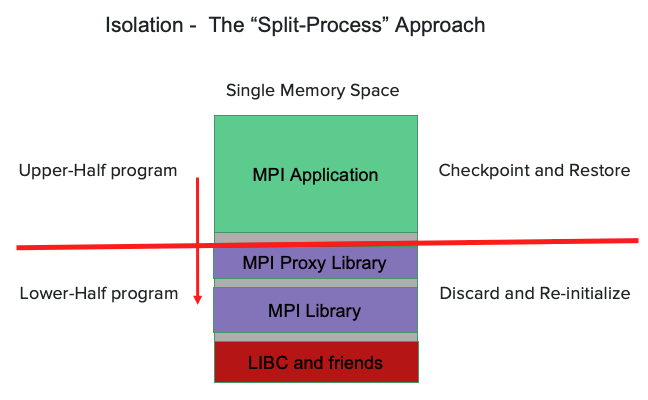
MANA addresses the critical maintenance cost of C/R tools over many combinations of MPI implementations and networks, and is transparent to the underlying MPI, network, libc library and Linux kernel. MANA is implemented as a plugin for DMTCP, therefore it lives completely in user space, and has been proven to be scalable to a large number of processes.
Starting from a proof-of-concept research code, MANA is under active development to use with production workloads. Its use on Perlmutter is therefore experimental. MANA may incur a high runtime overhead for applications that use MPI collective calls frequently. Developers have made significant progress on reducing the runtime overhead, and expect to fix the problem soon. Please report any issues you encounter at NERSC’s Help Desk.
!!! note
If your MPI application has sufficient internal C/R support,
you do not need MANA. MANA is for applications that do not have
internal C/R support or have limited C/R support.
MANA on Perlmutter
!!! failure “MANA not currently available”
MANA is not currently available on Perlmutter, but we plan to
provide the software in the future.
To access, run
shell
module load mana
To see what the mana module does, run
shell
module show mana
Benefits of Checkpointing/Restart
You are encouraged to experiment with MANA with your applications, enabling checkpoint/restart in your production workloads. Benefits of checkpointing and restarting jobs with MANA includes,
- increased job throughput
- the capability of running jobs of any length
- a charging discount when using the preempt QOS
- reduced machine time loss due to system failures
Compile to Use MANA
To use MANA to checkpoint/restart your applications, you do not need
to modify any of your codes. However, you must link your application
dynamically, and build shared libraries for the libraries that your
application depends on.
shell
module unload darshan xalt
ftn -qopenmp -o jacobi.x jacobi.f90
Note that the darshan and xalt modules (a light-weight I/O profiling tool
and a library tracking tool, respectively) are unloaded to avoid
any complications they may add to MANA.
C/R MPI Applications with MANA
C/R Interactive Jobs
You can use MANA to checkpoint and restart your MPI application interactively, which is convenient when testing and debugging MANA jobs. Here are the steps on Perlmutter:
Checkpointing
-
Get on a compute node using the
salloccommand, e.g., requesting 1 CPU node for one hourshell salloc –N 1 –C cpu –t 1:00:00 -q interactivethen load the
manamodule once on the compute node.shell module load mana -
Start the coordinator and specify the checkpoint interval, e.g., 300 seconds (-i300).
shell mana_coordinator -i300 -
Then launch your application (
a.out) with themana_launchcommand.shell srun -n 64 -c 4 --cpu-bind=cores mana_launch ./a.out [arg1 ...]Then MANA will checkpoint your application every 300 seconds. You can terminate your running job once checkpoint files are generated.
Restarting
To restart your job from the checkpoint files,
repeat steps 1-3 above, but replace the mana_launch command
in step 3 with the mana_restart command. The mana_restart command line
is as follows:
shell
srun -n 64 -c 4 --cpu-bind=cores mana_restart
Then MANA will restart from the checkpoint files and continue to run your application, checkpointing once every 300 seconds.
Note that MANA is implemented as a plugin in DMTCP, thereby uses
the dmtcp_coordinator, dmtcp_launch, dmtcp_restart,
and dmtcp_command commands of DMTCP as described in the
DMTCP page, but with additional command line options.
Since some of the command lines can be long, MANA provides bash scripts,
mana_coordinator, mana_launch, mana_restart, and mana_status,
respectively, to make the command lines short (easy to use).
In the example above, the mana_coordinator is a bash script that invokes the
dmtcp_coordinator command as a daemon (--daemon) in the background. The full
dmtcp_coordinator command line used in the above example is as follows:
shell
dmtcp_coordinator --mpi --daemon --exit-on-last -q -i300
Where the --mpi option is required to use MANA.
The mana_launch and mana_restart are bash scripts that invoke
the dmtcp_launch and dmtcp_restart, respectively, with added options
for MANA. Here are the dmtcp_launch and dmtcp_restart command lines
used in this example:
shell
srun -n64 -c4 --cpu-bind=cores dmtcp_launch -h `hostname` --no-gzip --join --disable-dl-plugin --with-plugin $MANA_ROOT/lib/dmtcp/libmana.so ./a.out [arg1 ...]
shell
srun -n64 -c4 --cpu-bind=cores dmtcp_restart --mpi -j  -h `hostname` --restartdir ./
MANA provides a command, mana_status, a bash script that invokes
the dmtcp_command, to
send the commands to the coordinator remotely, provided
you need to get on the compute node where your job is running first.
shell
mana_status --checkpoint  # checkpoint all processes
mana_status --status      # query the status
mana_status --quit        # kill all processes and quit
All mana_* commands support command line options (use --help to
see the list). For instance, you can save checkpoint files in a separate
directory using the --ckptdir <directory name> option
when invoking the mana_launch command. At restart, you can use
the --restartdir <directory name> option to specify the checkpoint files
for the mana_restart command.
C/R Batch Jobs
Assume the job you wish to checkpoint is run.slurm as shown below,
in which you request Perlmutter CPU nodes to run an MPI application for 24
hours. You can checkpoint and restart this job using the C/R job
scripts below, run_launch.slurm and run_restart.slurm.
Perlmutter CPU
??? example “run.slurm: the job you wish to checkpoint”
```slurm
--8<-- "docs/development/checkpoint-restart/mana/examples/pm-cpu.sh"
```
??? example “run_launch.slurm: launches your job under MANA control”
```slurm
--8<-- "docs/development/checkpoint-restart/mana/examples/pm-cpu-mana-preempt.sh"
```
??? example “run_restart.slurm: restarts your job from checkpoint files with MANA”
```slurm
--8<-- "docs/development/checkpoint-restart/mana/examples/pm-cpu-mana-restart-preempt.sh"
```
To run the job, just submit the C/R job scripts above,
shell
sbatch run_launch.slurm
sbatch run_restart.slurm   #if the first job is pre-terminated
sbatch run_restart.slurm   #if the second job is pre-terminated
...
The first job will run with a specified time limit of 24 hours. If it is
preempted before then, you will
need to submit the restart job, run_restart.slurm. You may need to
submit it multiple times until the job completes or has run for 24
hours as requested. You can use the
job dependencies to submit all
your C/R jobs at once (you may need to submit many more restart jobs
than actually needed). You can also combine the two C/R job scripts into one
(see the next section), and then submit it multiple times as dependent
jobs all at once. However, this is still not as convenient as
submitting the job script run.slurm only once. The good news is
that you can automate the C/R jobs using the features supported in
Slurm and a trap function (see the next section). The job scripts in
the next section are recommended to run C/R jobs.
Automate C/R Jobs
C/R job submissions can be automated using
preemptible jobs, so that
you just need to submit a single job script once as you would with your
original job script, run.slurm.
Here is the sample job script:
Perlmutter CPU
??? example “run_cr.slurm: a sample job script to checkpoint and restart your job with MANA automatically”
```slurm
--8<-- "docs/development/checkpoint-restart/mana/examples/pm-cpu-mana-preempt-vt.sh"
```
This job script combines the two C/R job scripts in the previous
section, run_launch.slurm and run_restart.slurm by checking the
restart count of the job (if block). Each job will run with a time
anywhere between the 2 hours guaranteed by the preempt QOS and time limit (-t),
checkpointing once every hour (-i 3600).
In the C/R job scripts, in addition to loading the mana module,
the nersc_cr module is loaded as well, which provides a set of bash
functions to manage C/R jobs, e.g., restart_count, requeue_job,
func_trap, ckpt_mana, etc., that are used in the job script.
What’s new in this script is that
-
It can automatically track the remaining walltime, and resubmit itself until the job completes or the accumulated run time reaches the desired walltime (48 hours in this example).
-
Optionally, each job checkpoints one more time 300 seconds before the job hits the allocated time limit.
-
There is only one job ID, and one standard output/error file associated with multiple shorter jobs.
These features are enabled with the following additional sbatch flags
and a bash function requeue_job, which traps the signal (USR1) sent
from the batch system:
```slurm
SBATCH –comment=48:00:00 #comment for the job
SBATCH –signal=B:USR1@
SBATCH –requeue #specify job is requeueable
SBATCH –open-mode=append #to append standard out/err of the requeued job
#to that of the previously terminated job
```
```shell
requeueing the job if remaining time >0
ckpt_command=ckpt_mana requeue_job func_trap USR1
wait ```
where the --comment sbatch flag is used to specify the desired
walltime and to track the remaining walltime for the job (after
pre-termination). You can specify any length of time, e.g., a week or
even longer. The --signal flag is used to request that the batch
system sends user-defined signal USR1 to the batch shell (where the
job is running) sig_time seconds (e.g., 300) before the job hits the
wall limit. This time should match the checkpoint overhead of your
job.
Upon receiving the signal USR1 from the batch system (300 seconds before
the job hits the wall limit), the requeue_job executes the following
commands (contained in a function func_trap provided on the
reuque_job command line in the job script):
shell
mana_status --checkpoint     #checkpoint the job if ckpt_command=ckpt_mana
scontrol requeue $SLURM_JOB_ID #requeue the job
If your job completes before the job hits the wall limit, then the batch system will not send the USR1 signal, and the two commands above will not be executed (no additional checkpointing and no more requeued job). The job will exit normally.
For more details about the requeue_job and other functions used in
the C/R job scripts, refer to the script cr_functions.sh provided by
the nersc_cr module. (type module show nersc_cr to see where the
script resides). You may consider making a local copy of this script,
and modifying it for your use case.
To run the job, simply submit the job script,
shell
sbatch run_cr.slurm
!!! note
1. It is important to make the `mana_launch` and
   `mana_restart` run in the background (**&**), and
   add a **wait** command at the end of the job script, so that
   when the batch system sends the USR1 signal to the batch shell,
   the **wait** command gets killed, instead of the `mana_launch`
   or `mana_restart` commands, so that they can
   continue to run to complete the last checkpointing right before
   the job hits the wall limit.

2. You need to make the `sig_time` in the `--signal` sbatch flag
   match the checkpoint overhead of your job.

3. You may want to change the checkpoint interval for your job,
   especially if your job's checkpoint overhead is high.  You can
   checkpoint only once before your job hits the wall limit.

4. Note that the `nersc_cr` module does not support csh. Csh/tcsh
   users must invoke bash before loading the module.
C/R Serial/Threaded Applications
If you run serial/threaded applications, we recommend that you use DMTCP to checkpoint and restart your jobs. See the DMTCP page for detailed instructions. MANA is recommended for checkpointing MPI applications.
Resources
-
MANA for MPI: MPI-Agnostic Network-Agnostic Transparent Checkpointing
-
User training on Checkpoint/Restart (May 2021):
-
Checkpoint/Restart MPI Applications with MANA on Cori (Slides) (Recording)
-
Checkpoint/Restart VASP Jobs Using MANA on Cori (Slides)
-