DMTCP: Distributed MultiThreaded Checkpointing
DMTCP is a transparent checkpoint-restart (C/R) tool that can preserve the state of an arbitrary threaded or distributed application to disk for the purpose of resuming it at a later time or in a different location. Being “transparent” describes how this process requires no modifications to either the application code or the Linux kernel. Additionally, no special system privilege is needed to use DMTCP; it can be operated by users without root access.
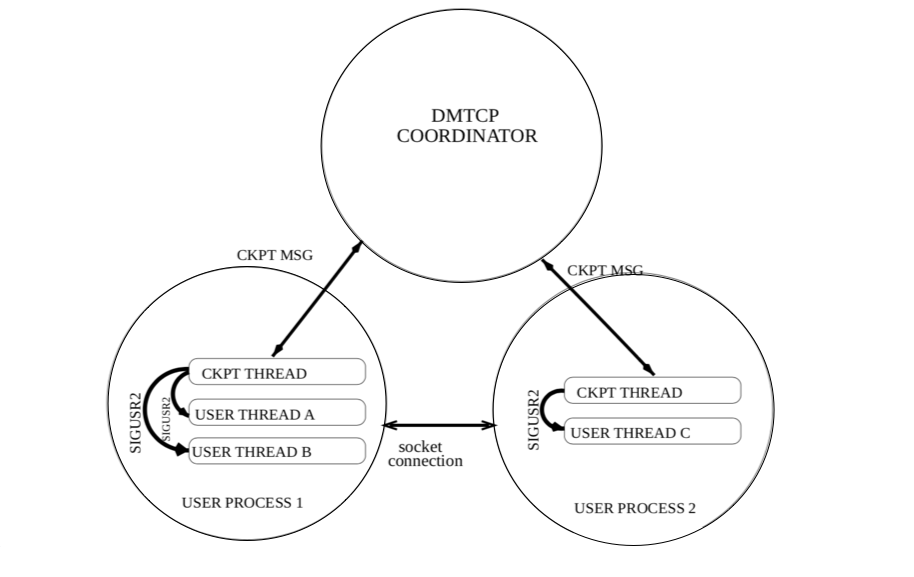
DMTCP uses a central coordinator process to accept user instructions and manage C/R operation as shown in the figure below.
There is one DMTCP coordinator for each application to be
checkpointed; the dmtcp_coordinator command runs this on one of the nodes allocated to the
job. Second, application tasks are started with DMTCP integration using dmtcp_launch which
connects to the coordinator. For each user
process in the application, a checkpoint thread is spawned that executes C/R instructions from
the coordinator. When prompted by either a user command to the coordinator or
automatically with a given frequency, DMTCP checkpoints
the state of the launched application and preserves everything on disk.
The application can then be restarted from the
checkpoint data on disk using the dmtcp_restart command.
!!! note
* Checkpoint files do not overwrite data for older checkpoints, so even if the coordinator fails
  in the middle of checkpointing, the application can still be resumed from the data in an
  earlier, undamaged checkpoint.
* DMTCP checkpoint files include the running process memory,
  context, open files as well as runtime libraries and
  Linux environment variables, and all the same types of data belonging
  to any additional processes that have been forked.
* During the checkpoint and restart process, either the DMTCP
  checkpoint thread or the user threads are active, but never both
  at the same time.
DMTCP supports a variety of applications, frameworks and programming languages including OpenMP, MATLAB, Python, C, C++, Fortran, shell scripting languages, and workflow management tools.
MPI applications require additional functionality provided by the DMTCP plugin MANA.
Benefits of transparent C/R
NERSC users are encouraged to experiment with combining their applications with DMTCP and transparent C/R. Benefits of doing so can include:
- increased job queue throughput by reducing wall time for individual Slurm requests
- the the ability to run jobs of any length despite maximum wall time limits for individual jobs
- 75% charging discount on Perlmutter when using the preempt QOS
- reduce lost progress when system failures occur
- help discover bugs and needs for additional functionality in DMTCP, which we can share with the DMTCP research and development teams
DMTCP on Perlmutter
DMTCP is provided to NERSC users as a
module on Perlmutter. Load DMTCP with the following command: module load dmtcp
Preparing applications to use DMTCP
Using DMTCP to checkpoint and restart applications does not require code modifications, but, it does require that applications be dynamically linked and use shared libraries (.so files) instead of static libraries.
C/R Serial/Threaded Applications with DMTCP
C/R Interactive Jobs
DMTCP can be used to checkpoint and restart serial/threaded
application interactively, which is convenient during testing and
debugging. The steps to do so on Perlmutter follow:
Checkpoint
-
Obtain a terminal connection to a compute node using the
salloccommand.shell salloc –N 1 –C cpu –t 1:00:00 -q interactiveLoad the dmtcp module.
shell module load dmtcp -
Open another terminal, and ssh to the compute node that is allocated for your job. Then start a DMTCP coordinator.
shell module load dmtcp dmtcp_coordinator -
On the first terminal, launch your application (
a.out) with thedmtcp_launchcommand.shell dmtcp_launch --join-coordinator ./a.out [arg1 ...] -
While your application is running, on the second terminal you can use the
dmtcp_coordinatorto send C/R commands to your running job. ‘?’ for available commands. Examples include ‘c’ for checkpointing, ‘s’ for querying the job status, and ‘q’ for terminating the job.
Restart from a checkpoint
-
Same as step 1 above, use
sallocto obtain a terminal on a compute node. -
Repeat earlier step 2 to start the
dmtcp_coordinator. -
Restart the application from a checkpoint using the
dmtcp_restartcommand.shell dmtcp_restart --join-coordinator ckpt_a.out_*.dmtcp -
As in step 4 above, the terminal running
dmtcp_coordinatorcan be used to send C/R instructions to your running application.
If dmtcp_launch and dmtcp_restart are used without the --join-coordinator flag, they will automatically run
a new dmtcp_coordinator, which detaches from its parent process. dmtcp_coordinator can also be run
as a daemon (using the –daemon option) in the background (this is
useful for batch jobs). dmtcp_command is available to
send commands to a coordinator remotely.
shell
dmtcp_command --checkpoint  # checkpoint all processes
dmtcp_command --status      # query the status
dmtcp_command --quit        # kill all processes and quit
All dmtcp_* commands support command line options (use --help to
see the list). For instance, periodic checkpointing can be enabled
using the -i <checkpoint interval (secs)> option when invoking
dmtcp_coordinator, dmtcp_launch or dmtcp_restart commands.
If the intended coordinator is running on a different host and/or listening to a port other than 7779,
-h <hostname> or -p <port number> options, or
the environment variables DMTCP_COORD_HOST and
DMTCP_COORD_PORT, can be used to help dmtcp_launch or dmtcp_restart connect to the coordinator.
C/R Batch Jobs
The following example components demonstrate the basic use of Slurm scripts to
checkpoint and restart an application contained in payload.sh
These examples use helper scripts from the
nersc_cr module, which provides a set of bash
functions to assist the management C/R jobs. For example, start_coordinator is a
bash function that invokes the dmtcp_coordinator command as a daemon
in the background, assigns an arbitrary port number for the
coordinator, and creates a dmtcp_command script to assist communication with the daemon.
Perlmutter CPU
??? example “payload.sh: contains the application you wish to checkpoint”
bash
    --8<-- "docs/development/checkpoint-restart/dmtcp/examples/payload.sh"
??? example “perlmutter-cpu-dmtcp.sh: launch the application with DMTCP”
slurm
    --8<-- "docs/development/checkpoint-restart/dmtcp/examples/perlmutter-cpu-dmtcp.sh"
??? example “Output of starting perlmutter-cpu-dmtcp.sh”
shell
    --8<-- "docs/development/checkpoint-restart/dmtcp/examples/perlmutter-cpu-dmtcp.output"
??? example “perlmutter-cpu-dmtcp-restart.sh: use DMTCP checkpoint files to restart the payload application”
slurm
    --8<-- "docs/development/checkpoint-restart/dmtcp/examples/perlmutter-cpu-dmtcp-restart.sh"
??? example “Output of using perlmutter-cpu-dmtcp-restart.sh to resume the application in a new Slurm job”
shell
    --8<-- "docs/development/checkpoint-restart/dmtcp/examples/perlmutter-cpu-dmtcp-restart.output"
With modification to Slurm parameters such as --time or --QOS, and the substitution
of payload.sh for a real application, this pattern can be used to
checkpoint and restart an arbitrary single node workload. When using a QOS which supports
pre-emption, the --time-min Slurm parameter in can be used to ensure your
application will run for at least that minimum amount of time.
!!! warning “Change the QOS for production workloads”
When adapting this and following examples to run a production
worload, don't forget to change the requested QOS from `debug` to
another such as `regular` or `preempt`.
The dmtcp_restart_script.sh used in the restart job scripts is a bash
script generated by the dmtcp_coordinator. It wraps the
dmtcp_restart command to use the most recent successful checkpoint files for
convenience.
The job dependencies Slurm feature can be used to submit an initial job request, and any number of subsequent restart jobs, all at the same time while guaranteeing no restarts are attempted before the predecessor job has ended.
??? note
While a C/R job is running, a checkpoint can be manually triggered,
if needed, using the wrapped `dmtcp_command`
command, `dmtcp_command.<jobid>`, which is automatically created in the
working directory of a job. This command can be run from a Perlmutter login node in
the working directory of your job as follows:

```shell
module load dmtcp
ssh <nidXXXXXX> "cd $(pwd); ./dmtcp_command.<jobid> --checkpoint"
```

Where the <nidXXXXXX> is the name of the node where your job is running
and <jobid> is the Slurm job id number associated with your job.
Automate C/R Jobs
C/R job submissions can be further automated using the variable-time job script, such that only a single job script submission is used to operate full checkpoint-restart functionality.
Perlmutter
??? example “perlmutter-cpu-dmtcp-vt.sh: a sample job script which runs the payload task while DMTCP operates automatically”
```slurm
--8<-- "docs/development/checkpoint-restart/dmtcp/examples/perlmutter-cpu-dmtcp-vt.sh"
```
This script uses the same basic concepts as the manual start and restart scripts above, but adds automation to reduce the manual actions needed to operate checkpoint-restart functions. As a result the single script submission to Slurm can manage the entire process.
-
The Slurm comment field is used to set and track the maximum total compute time which can be requested by the first job and all requeued jobs. If job time expires and its task is still running, a checkpoint is created, the job is requeued, and the comment field updated to reflect how much time remains.
-
As the simplest example, the job is not automatically checkpointed with a timed schedule, but only does so when receiving the system signal from Slurm that it is about to be ended. If scheduled checkpoints are still desired, return the
-iflag to thestart_coordinatorcommand. -
There is only one job id, and one standard output/error file associated with multiple requeued jobs. The Slurm
sacctcommand accepts a--duplicatesflag which can be used to display more complete information about requeued jobs.
These features are enabled with the following additional sbatch flags
and a bash function requeue_job, which traps the signal (USR1) sent
from Slurm:
```slurm
SBATCH –comment=12:00:00 #maximum time available to job and all requeued jobs
SBATCH –signal=B:USR1@60
SBATCH –requeue #specify job is requeueable
SBATCH –open-mode=append #to append standard out/err of the requeued job
#to that of the previously terminated job
```
```shell
requeueing the job if remaining time >0
ckpt_command=ckpt_dmtcp requeue_job func_trap USR1
wait ```
where the --comment sbatch flag is used to specify the desired
walltime and to track the remaining walltime for the job (after
pre-termination). You can specify any length of time, e.g., a week or
even longer. The --signal flag is used to request that the batch
system sends user-defined signal USR1 to the batch shell (where the
job is running) sig_time seconds (e.g., 60) before the job hits the
wall limit. i
Upon receiving the signal USR1 from the batch system 60 seconds before
the job hits the wall limit, the requeue_job executes the following
commands (contained in a function func_trap provided on the
requeue_job command line in the job script):
shell
dmtcp_command --checkpoint     #checkpoint the job if ckpt_command=ckpt_dmtcp
scontrol requeue $SLURM_JOB_ID #requeue the job
If your job completes before the job hits the wall limit it will exit normally; the batch system will not send the USR1 signal, and the two commands above will not be executed (no additional checkpointing and no additional requeued job).
For more details about the requeue_job and other functions used in
the C/R job scripts, refer to the script cr_functions.sh provided by
the nersc_cr module. (type module show nersc_cr to see where the
script resides). You may consider making a local copy of this script,
and modifying it for your use case.
To run the job, simply submit the job script,
shell
sbatch vim perlmutter-cpu-dmtcp-vt.sh
!!! note
1. It is important to make the `dmtcp_launch` and
   `dmtcp_restart_script.sh` run in the background (**&**), and
   add a **wait** command at the end of the job script, so that
   when the batch system sends the USR1 signal to the batch shell,
   the **wait** command gets killed, instead of the `dmtcp_launch`
   or `dmtcp_restart_script.sh` commands, so that they can
   continue to run to complete the last checkpointing right before
   the job hits the wall limit.

2. The `sig_time` in the `--signal` sbatch flag should match or exceed
   match the checkpoint overhead of your job.

3. Though one checkpoint at the end of a job is automated, setting the
   checkpoint interval for your job may still be useful for recovering
   from application failures.
C/R MPI Applications with MANA
NERSC supports
MANA
for checkpointing/restarting MPI applications on Perlmutter,
which works with any MPI implementation and network, including Cray
MPICH. MANA is implemented as a plugin in DMTCP, and users the
dmtcp_coordinator, dmtcp_launch, dmtcp_restart,
and dmtcp_command as described above, but with additional command line
options. See the MANA page for additional information about
checkpointing/restarting MPI applications.
DMTCP Help Pages
??? example “dmtcp_coordinator help page”
```shell
--8<-- "docs/development/checkpoint-restart/dmtcp/txt/dmtcp_coordinator.txt"
```
??? example “dmtcp_launch help page”
```shell
--8<-- "docs/development/checkpoint-restart/dmtcp/txt/dmtcp_launch.txt"
```
??? example “dmtcp_restart help page”
```shell
--8<-- "docs/development/checkpoint-restart/dmtcp/txt/dmtcp_restart.txt"
```
??? example “dmtcp_command help page”
```shell
--8<-- "docs/development/checkpoint-restart/dmtcp/txt/dmtcp_command.txt"
```
Resources
- DMTCP website
- DMTCP github
- DMTCP user training slides (Nov. 2019)
- dmtcp modules on Cori used https://github.com/JainTwinkle/dmtcp.git (branch: spades-v2)
- MANA for MPI: MPI-Agnostic Network-Agnostic Transparent Checkpointing