Containerized Checkpoint-Restart (C/R) Mechanisms for High-Performance Computing (HPC)
High-Performance Computing (HPC) systems are crucial for solving complex scientific problems but challenges like resource management, fault tolerance, and maintaining consistent performance across diverse environments can be difficult. Container technologies like NERSC’s Shifter and Podman-HPC offer some solutions to these problems. We used Distributed MultiThreaded CheckPointing (DMTCP) technologies to implement robust Checkpoint-Restart (C/R) mechanisms to handle challenges with fault tolerance and resource management within containerized environments.
This section highlights successful C/R implementations on Perlmutter at NERSC using Shifter, Podman-HPC, and Apptainer, which has broader adoption in the HPC container space to show where C/R within containers could be used at more HPC centers.
Containers play a critical role in optimizing high-performance computing (HPC) workflows. In the context of checkpoint-restart (C/R) mechanisms, containers significantly enhance efficiency by integrating DMTCP. This integration allows for the seamless pausing, resuming, and migration of jobs without restarting computations from scratch. By enabling the smooth resumption of long-running tasks after interruptions, containers help reduce computational overhead, improve resource utilization, and optimize job scheduling. As a result, containers have become essential for ensuring operational resilience, consistent performance, and cost-effectiveness in HPC environments.
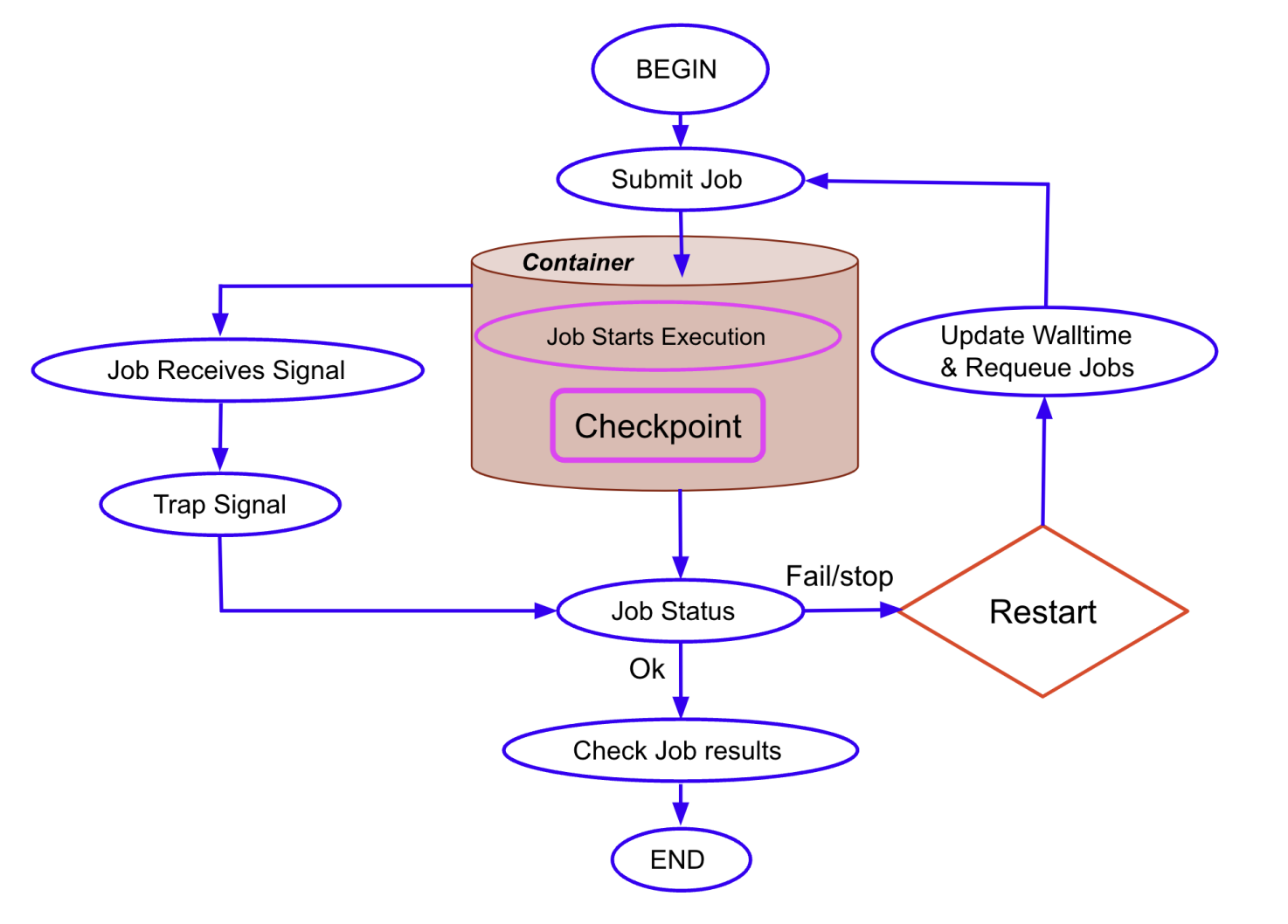
The figure illustrates the automated job management process within NERSC’s containerized HPC environment. The workflow covers the entire lifecycle of a computational job, from submission to execution, checkpointing, and signal trapping for job resubmission. When a job reaches its time limit or encounters a termination signal, the checkpoint-restart (C/R) mechanism activates, capturing the job’s state and requeuing it to resume later. The diagram highlights the decision-making flow following a termination signal, showing how the system either completes the job or restarts it based on the checkpoint data. This automated C/R strategy ensures efficient use of resources by enabling jobs to continue from their last saved state, minimizing downtime and maximizing computational efficiency. This is a visual representation of how DMTCP-enabled C/R is integrated into the containerized environment, emphasizing the seamless interaction between job scheduling, signal handling, and resource allocation within NERSC’s Shifter and Podman-HPC containers.
Preparing a Dockerfile for C/R
DMTCP cannot be checkpointed from outside the containers. It must be included within the container when it is build.
The simulation package can be built using several methods:
- During the container’s build process: The package is compiled and installed when the container is initially built.
- After the container has been built: The source code can be linked from an external location, allowing for flexibility and updating code without rebuilding the entire container.
- Extending an existing container: You can build on top of an already existing container image, which is efficient for quick experimentation and requires minimal modifications.
All of these methods have been thoroughly tested and validated, ensuring compatibility with DMTCP for C/R within containers. It provides flexibility for various use cases, ensuring efficient setup for simulations in a containerized HPC environment like NERSC’s Perlmutter system.
Below is an example script to integrate DMTCP into an existing container. This script pulls the latest DMTCP source, configures, compiles, and installs it as part of the container. It demonstrates how DMTCP can be embedded within a container by extending an existing container.
??? example “Dockerfile: Integrate DMTCP into an existing container”
bash
    --8<-- "docs/development/checkpoint-restart/containers/examples/Dockerfile"
C/R Batch Jobs within a Container
A custom batch script is designed for batch job management in an HPC environment and is critical in handling DMTCP-based checkpointing within Slurm-managed jobs. It converts execution time into a human-readable format, calculates the remaining time for job scheduling, and updates job comments to reflect the current state. It also manages job requeuing based on the remaining time, ensuring seamless job continuation without user intervention. The script automatically traps termination signals, performs checkpointing, and requeues jobs with updated time limits. This design integrates DMTCP’s checkpointing capabilities into the fabric of job management workflows, ensuring reliable and automated resumption of interrupted tasks.
??? example “cr_env.sh: Script to integrate DMTCP and manage C/R within the container for seamless job execution and requeuing”
bash
    --8<-- "docs/development/checkpoint-restart/containers/examples/cr_env.sh"
Key Points:
- Time Tracking: The functions
secs2timestrandtimestr2secsare used to convert time formats between human-readable form and seconds, facilitating easier tracking and job scheduling. - Job Requeuing: The
parse_jobfunction calculates the remaining job time and updates SLURM job comments with the calculated next requeue time, ensuring efficient job requeuing management. - Signal Trapping: The
func_trapfunction handles signals (such as termination signals), performing checkpointing when a signal is received and ensuring the job is properly requeued for later execution. - DMTCP Coordination: The
start_coordinatorfunction initializes the DMTCP coordinator, enabling the checkpoint-restart functionality within the job, which allows seamless pausing and resumption of tasks. - Checkpointing: The
wait_coordandckpt_dmtcpfunctions manage the checkpointing process, waiting for the coordinator to complete the checkpoint and ensuring that the job’s state is saved correctly.
Automated C/R Strategies (Jobs)
The automated /R strategy ensures
seamless job execution and resubmission by integrating
DMTCP with Slurm job scheduling.
It automates the process of pausing, checkpointing, and resuming jobs,
ensuring that jobs can continue from their last checkpoint after
a termination signal (e.g., SIGTERM) or time limit is reached.
This is particularly useful in HPC environments, where long-running
jobs must be periodically interrupted for resource allocation.
Below, we break down the main components involved in the automation process using the main.sh, wrapper.sh, and example_g4.sh scripts. These scripts work together to manage the lifecycle of an HPC job inside a container, ensuring that the job can checkpoint, terminate, and restart seamlessly.
main.sh
The main.sh script defines the Slurm job properties
and manages the initial job setup. It handles setting the container
environment, trapping termination signals, and ensuring
that the job is automatically requeued and restarted when needed.
??? example “main.sh: main Slurm script to submit the job using Shifter container”
bash
    --8<-- "docs/development/checkpoint-restart/containers/examples/main.sh"
Key Points:
- Slurm Job Properties: The script uses Slurm directives to define job parameters such as job name, QOS, node architecture, and wall clock time.
- Signal Handling: The job is configured to catch a
SIGTERMsignal 60 seconds before termination, triggering the checkpoint process and requeue. - Containerized Execution: The job runs within a containerized environment using Shifter (for e.g.), ensuring portability and reproducibility.
wrapper.sh
The wrapper.sh script is responsible for managing the
checkpoint-restart logic in the job.
It starts the DMTCP coordinator, handles job restarts,
and traps termination signals for checkpointing.
This ensures that the job can either start fresh or resume from a checkpoint.
??? example “wrapper.sh: script to manage the checkpoint-restart logic in the job”
bash
    --8<-- "docs/development/checkpoint-restart/containers/examples/wrapper.sh"
Key Points:
- Job Initialization: If the job is being launched
for the first time, the
dmtcp_launchcommand is used to start the simple application (payload.sh) or high energy physics application; Geant4 (example_g4.sh), with checkpointing enabled at 300-second intervals. - Job Restart: If the job has been checkpointed
previously, it restarts from the last saved checkpoint
using the
dmtcp_restart_script.shfile, ensuring the job can continue from where it left off. - Signal Trapping: The script traps the
SIGTERMsignal, which triggers theckpt_dmtcpfunction to checkpoint the job’s state, ensuring it is saved before requeuing or terminating.
Similar to the section DMTCP,
the following example components demonstrate the basic use of Slurm scripts to
checkpoint and restart an application contained in payload.sh.
??? example “payload.sh: script contains the application you wish to checkpoint”
bash
    --8<-- "docs/development/checkpoint-restart/containers/examples/payload.sh"
Additionally, here is an example of a real scientific application in high-energy physics,
Geant4, which we have successfully tested with the
checkpoint-restart mechanism. An important note is that we need to use the :
command at the end to ensure DMTCP recognizes the completion of the Geant4 simulation,
as it doesn’t natively detect the end of the application.
??? example “example_g4.sh: actual Geant4 simulation code to run inside the container”
bash
    --8<-- "docs/development/checkpoint-restart/containers/examples/example_g4.sh"
??? example “g4bench.conf: file to configure the Geant4 benchmark settings”
json
    --8<-- "docs/development/checkpoint-restart/containers/examples/g4bench.conf"
C/R with podman-hpc and Apptainer
The example above is using Shifter for containerized execution.
However, if you want to use podman-hpc or Apptainer, you will need to modify
the main.sh file accordingly. Below are the modified versions
of the main.sh file for each case.
Using podman-hpc
If you want to use podman-hpc, the main.sh file will look like this:
??? example “main_podmanhpc.sh: main Slurm script to submit the job using podman-hpc container”
bash
    --8<-- "docs/development/checkpoint-restart/containers/examples/main_podmanhpc.sh"
The rest of the files remain the same as the Shifter example.
Using Apptainer
If you want to use Apptainer, the main.sh file will look like this:
??? example “main_apptainer.sh: main Slurm script to submit the job using apptainer container”
bash
    --8<-- "docs/development/checkpoint-restart/containers/examples/main_apptainer.sh"
The rest of the files remain the same as the Shifter example.
The checkpoint-restart (C/R) mechanism can also be executed directly on Perlmutter without the need for containers. For more details, refer to the documentation at NERSC Checkpoint-Restart.
References
For more details on the checkpoint-restart mechanisms and containerized HPC environments, you can refer to the following resources:
-
Optimizing Checkpoint-Restart Mechanisms for HPC with DMTCP in Containers at NERSC
This paper provides a comprehensive overview of the techniques used in this work, including the implementation of DMTCP in various container platforms like Shifter and podman-hpc. -
Checkpoint-Restart in Containerized HPC Environments - NERSC Data Day 2024 Presentation
This presentation from NERSC Data Day 2024 highlights the use of checkpoint-restart mechanisms and their integration into containerized HPC environments for enhancing job reliability and efficiency.